
WordPress analytics without cookies
See how many visitors come to your WordPress site and where from, without a cookie banner and without another heavy plugin. One script in the header is enough.
Analytics in WordPress, without the baggage
There are many ways to count visitors on WordPress. Most of them have a catch.
Google Analytics sets cookies. For that you usually need a cookie banner, and visitors who decline are missing from your stats.
Stats plugins usually store the data in your WordPress database. That is convenient, but then WordPress has to do work on every page view, and the database grows over time.
I used a stats plugin on my own WordPress sites for a long time myself, and it worked well. But not all of my projects run on WordPress. A WordPress plugin does not work on those sites, so I needed a second tool. In the end I had my numbers in several places. That is why I built Lienks: one tool for all my websites, no matter what they are built with.
What Lienks does differently for WordPress
No cookie banner needed
In its default mode, Lienks stores nothing on your visitors' devices. So for Lienks itself, you usually do not need a banner. I explain how this works on the Cookieless Web Analytics page.
No load on WordPress
Lienks is a small script that sends the data directly to Lienks. Your WordPress database is not affected, and WordPress does not have to do anything extra for the stats.
All sites in one dashboard
Do you have several WordPress sites, or WordPress and other projects? Every plan lets you add as many websites as you want.
Servers in Germany
All analytics data is stored on Hetzner servers in Germany.
Adding Lienks to WordPress
There is no dedicated WordPress plugin yet. But you do not need one: Lienks is a single script that belongs in the <head> of your site.
<script defer src="https://app.lienks.com/a.js" data-site="YOUR-SITE-ID"></script>You have two options:
With a plugin for header code
If you already use a plugin for custom code in the header, for example WPCode, add the script there in the header section. This is the easiest way, and the script survives theme updates.
In your theme
Some themes have a field for header scripts in their settings. You can paste the script there directly. Alternatively, add these lines to the functions.php of your child theme:
add_action('wp_head', function () {
    echo '<script defer src="https://app.lienks.com/a.js" data-site="YOUR-SITE-ID"></script>';
});
Use a child theme for this. Otherwise the change is gone with the next theme update.
After that, you will see your first visitors right in your dashboard.
What you see for your WordPress site
- pageviews, visitors and sessions
- your most visited posts and pages
- sources, so whether your visitors come from Google, social networks or other websites
- campaigns via UTM parameters
- custom events, for example submitted contact forms or clicks on a button
- countries, browsers and devices
You can see how custom events work on the How it works page.
To be honest
Lienks is not the right choice for every WordPress site:
- Lienks is a paid tool, starting at 9 € per month. You can see all plans on the pricing page. There are free stats plugins for WordPress.
- The data is stored at Lienks, not in your WordPress database.
- You see the numbers in the Lienks dashboard, not in the WordPress backend.
If you only have WordPress sites and want everything inside WordPress, take a look at Koko Analytics. I used it myself for a long time and like it a lot. It is lightweight and stores the data directly in your WordPress database.
It reaches its limit when you also have sites that do not run on WordPress, for example on another CMS or a framework. A WordPress plugin does not work there, and you need a second tool again. Lienks works on any website and shows you all of them in one account.
See it with real data
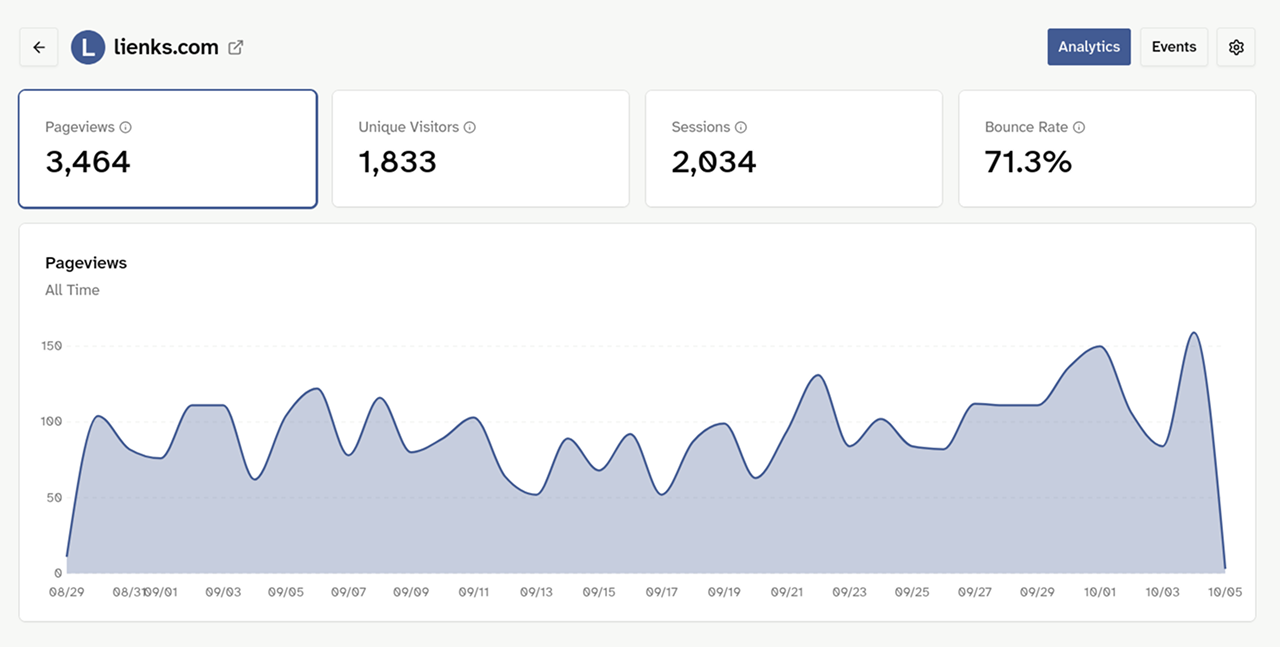
The stats of lienks.com are public. You can see the dashboard with real numbers there, without signing up.
View live demoFAQ
Not yet. But you do not need one: add the script through a plugin for header code or in your theme. How that works is described further up on this page.
For Lienks itself, usually not. In minimal and cookieless mode, Lienks stores nothing on your visitors' devices. Other plugins or embedded content on your WordPress site, for example YouTube videos, maps or ad pixels, can still require a banner. This is not legal advice. You can read more on the GDPR-compliant web analytics page.
Lienks loads a small script and sends the data directly to Lienks. WordPress and your database do not have to do anything extra for it.
Yes, as long as you can add a script to the <head>. That works with any theme, either through a plugin for header code or through the theme itself.
Yes. Every plan includes unlimited websites. Each site gets its own dashboard.
Yes, with custom events. You can see how on the How it works page.
Yes. This way you can compare the numbers for a while before you deactivate the old plugin. Your existing data is not imported, Lienks counts from the moment you add it.
Ready to see what's happening on your websites?
Try Lienks free for 30 days. No payment method required.
Try Lienks for free