
Over time, a web analytics tool collects one thing above all: a lot of events.
Pageviews, custom events, referrers, devices and plenty of other data have to be stored and then analyzed again later, as quickly as possible. When I built Lienks, a simple, privacy-friendly web analytics tool, I had to decide fairly early where that data should actually live.
What is ClickHouse, and why do I use it?
ClickHouse is a database built specifically for analyzing large amounts of data quickly, and that is exactly what makes it interesting for an analytics tool like Lienks.
Unlike PostgreSQL, ClickHouse stores data by column instead of by row.
Put simply, all timestamps, all countries or all event names sit together, instead of each event being stored as one complete row.
So if I only want to know how many pageviews came from Germany in the last 30 days, ClickHouse only has to look at the columns that matter for that question.
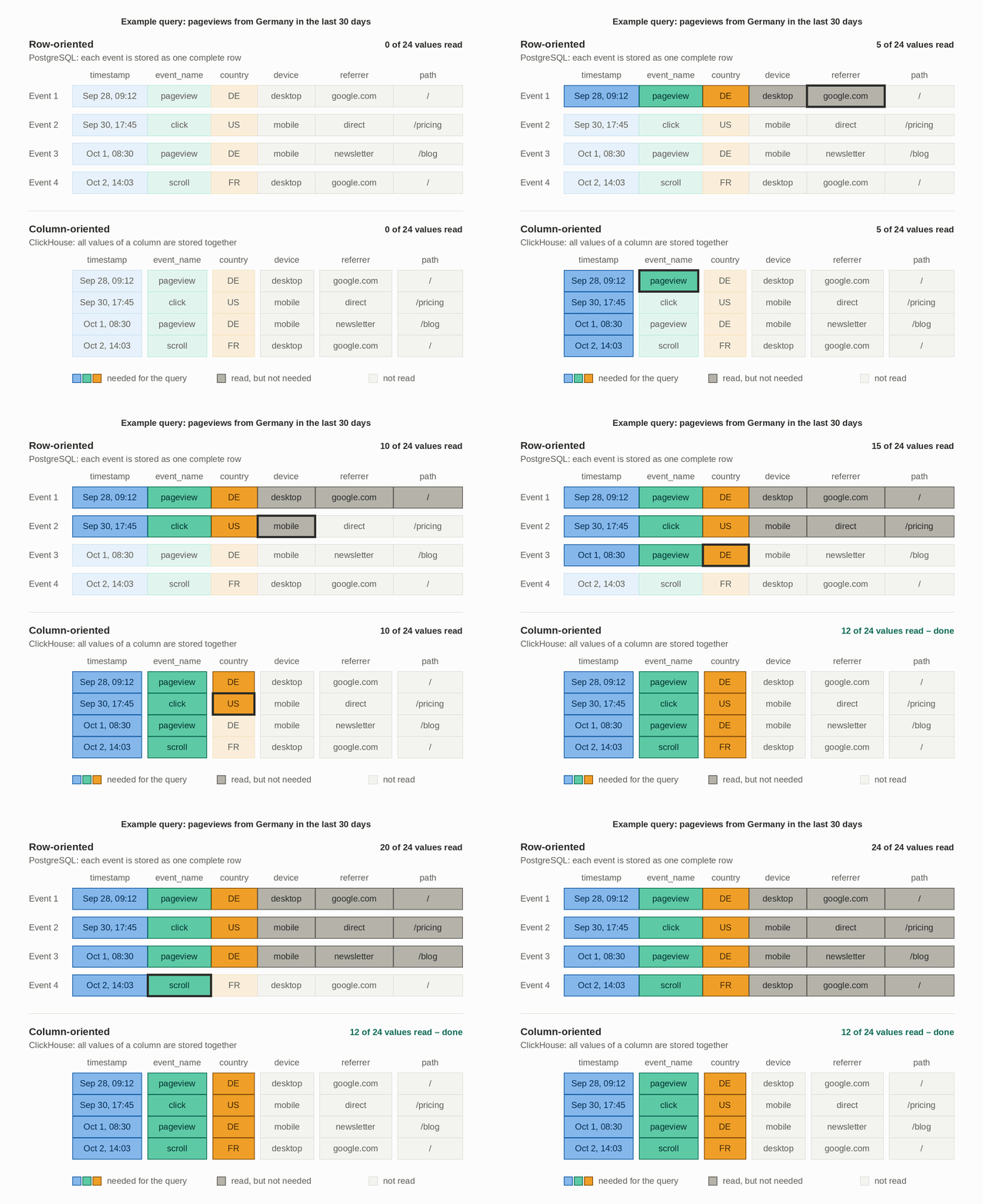
With a few thousand events, this difference doesn’t matter much. But the larger the dataset gets, the more interesting this approach becomes, because many analytics queries only need to read a small part of the stored data.
That was one of the reasons I used ClickHouse for Lienks’ analytics data from the start. Not because PostgreSQL would be too slow right now, but because I expect the number of events to grow over time and the analyses to get more complex.
PostgreSQL and ClickHouse at Lienks
That doesn’t mean PostgreSQL plays no role at Lienks. Quite the opposite: both databases run side by side and have different jobs.
I use PostgreSQL for the classic application data. That’s where users, workspaces, websites, members, billing and usage limits live.
The actual analytics data goes into ClickHouse. That includes pageviews and custom events, with information such as time, path, referrer, country, browser or device.
This split also makes sense to me conceptually. When I load a user or a website from PostgreSQL, I’m usually looking for a few specific records. With analytics data it’s the other way around: I often want to analyze a great many events at once and compute a number, a time series or a ranking from them.
That is exactly the difference from the graphic above: for a single user I need the whole row, for an analysis across millions of events only a few columns.
Why ClickHouse is a good fit for web analytics
Column-oriented storage isn’t the only reason, though. Events have a few properties that suit ClickHouse particularly well.
First, events are written once and never touched again. A pageview that has been stored never changes. Application data is different: a user changes their email address, or a workspace gets a new name. ClickHouse is designed for exactly the first case, taking in a very large number of new rows quickly without existing ones constantly being changed.
Second, the values repeat a lot. The country column contains “DE” thousands of times, the device column says “mobile” or “desktop” over and over, and paths and referrers come up again and again too. Because ClickHouse stores all values of a column together, they compress very well. The data takes up less space, and a query has less to read.
Third, almost every question in the dashboard is an analysis over a period of time. How many visitors were there in the last 7 days? Which pages were viewed most this month? Which referrers brought the most visitors? To answer these, the database has to count, group and sort many events, and that is exactly what ClickHouse is fast at.
That’s no coincidence: ClickHouse was originally developed at Yandex for their own web analytics service. Web analytics is the very case the database was built for. I don’t have to bend it to make it fit my data.
Do I need ClickHouse to get started?
The honest answer is: no. At Lienks’ current size, PostgreSQL would probably be perfectly sufficient.
PostgreSQL handles a few million rows well, and with the right indexes the dashboard queries would be fast enough there too.
On top of that, ClickHouse isn’t free. I now run two databases instead of one, with two containers and two sets of migrations. When a website is deleted, I have to clean up in two places. And when I need data from both worlds together, say the number of events per workspace, I can’t write a simple join. I have to merge the results in code.
So why did I do it anyway? At the beginning I asked myself what makes more sense in the long run. PostgreSQL would have been enough for a long time. But if Lienks really does get a lot of users, we’re quickly talking about hundreds of millions or billions of events, and for that I think ClickHouse is the better solution. I preferred to pick what fits in the long term from the start, rather than having to migrate the data later while everything is running.
For me it was less a decision for today than a bet on later. The extra effort is real but manageable, and I’d rather pay it now than in the middle of growth.
Would I use ClickHouse for other projects too?
Despite my good experience with ClickHouse, I wouldn’t just add it to every new project.
Most applications consist of data that changes all the time: users, orders, settings. That is exactly what ClickHouse is not made for. Changing or deleting individual records is cumbersome there, and transactions as you know them from PostgreSQL don’t exist. For that kind of data, PostgreSQL remains my first choice, at Lienks too.
It’s a different story when a project collects a very large number of similar entries that are only written and then analyzed later. These can be events, as with Lienks, but also logs or metrics. Cloudflare uses ClickHouse to analyze its web traffic, and the analytics tool PostHog is built on it too. As soon as I know that this kind of data is the core of the product and can grow quickly, I would plan for ClickHouse early again.
So my rule of thumb is: PostgreSQL for everything the application manages, and ClickHouse only once there is data that looks like events. At Lienks, that was the case from day one.