
An analytics tool shows you which website your visitors come from. It often doesn’t show you which link.
For example, I have a link to Lienks on Indie Hackers. When someone clicks it, my dashboard only tells me the visit came from indiehackers.com. Whether it was my product page, a comment or a post, I can’t tell.
For some sources, I don’t even get that. If someone clicks a link in a newsletter, an app, a messenger or a PDF, the visit often arrives without a referrer. The browser simply doesn’t say where the visit came from.
The fix is simple: you label your links yourself. That’s exactly what UTM parameters are for.
What are UTM parameters?
UTM parameters are small additions at the end of a link. They come after a question mark and don’t change anything on the page. Whoever clicks the link lands on the same page as always. The analytics tool just reads the additions and then knows where the visit came from.
This is one of my real links:
https://lienks.com/?utm_source=habitheat&utm_medium=footer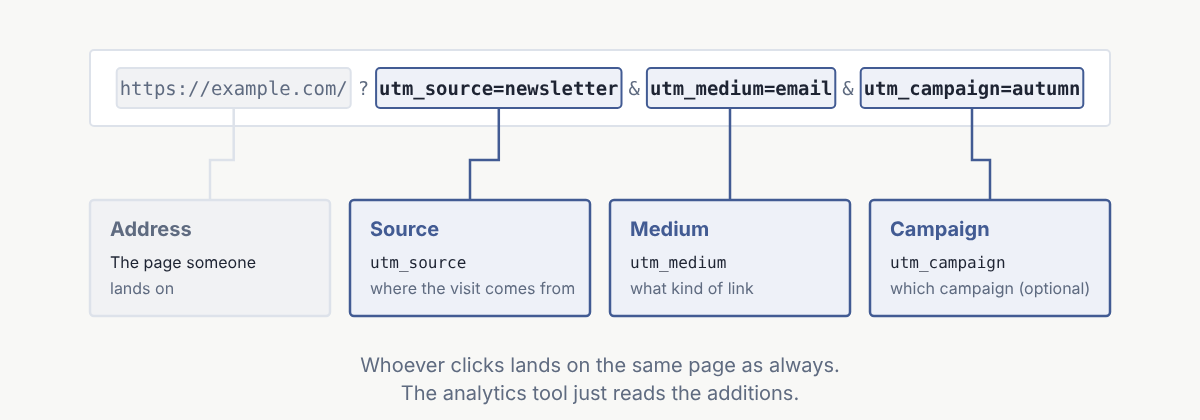
To get started, you only need three parameters:
- utm_source says where the visit comes from, for example
habitheat,newsletterorindiehackers. - utm_medium says what kind of link it is, for example
footer,socialoremail. - utm_campaign says which campaign the link belongs to, for example
launchorblack_friday. You can leave this one out.
There are two more, utm_term and utm_content. They come from advertising, for example for search terms in ads. Most small websites don’t need them, and Lienks doesn’t read them.
My three real links
So far I’ve linked to Lienks in three places and labeled every link:
https://lienks.com/?utm_source=habitheat&utm_medium=footer
https://lienks.com/?utm_source=indiehackers&utm_medium=social&utm_campaign=product_page
https://lienks.com/de?utm_source=notendurchschnitt-berechnen&utm_medium=ects-rechner
The first one is in the footer of habitheat, another one of my websites. The second is on my product page on Indie Hackers. The third is in an ECTS calculator on notendurchschnitt-berechnen.de, a German grade calculator that is also one of my sites.
This is what it looks like in my dashboard:
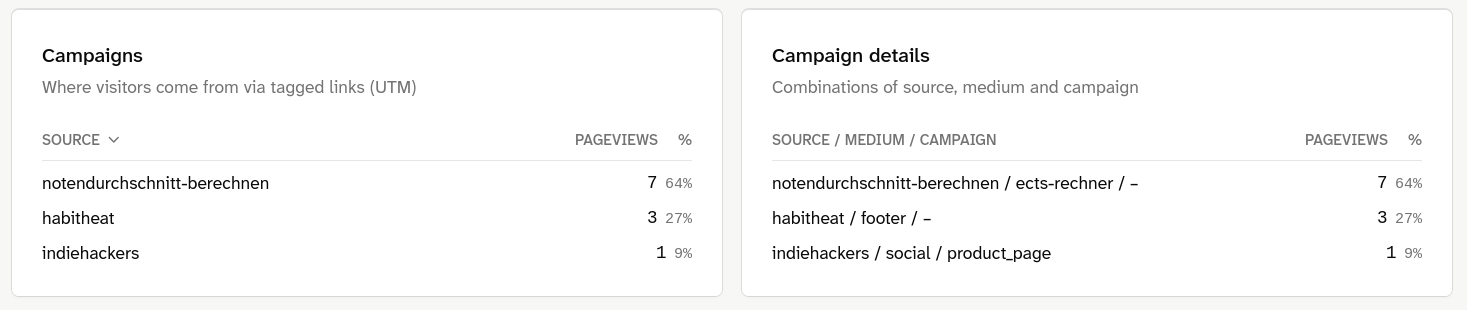
The numbers are small, but they already show something I didn’t expect: the ECTS calculator brings more visitors than Indie Hackers. Without the labels, I wouldn’t have known. For the calculator I would only have seen the domain, and for Indie Hackers I couldn’t have told whether the visit came from my product page or from some comment.
How to build a UTM link
You don’t need a tool for this. You take your normal link and add the parameters at the end:
- Add a
?after the address. - Then
utm_source=and your name for the source. - For each additional parameter, add a
&, then the next one.
If your link already contains a ?, just use & for the first UTM parameter.
A few rules that will save you trouble later:
- Write everything in lowercase.
Newsletterandnewsletterare two different sources for an analytics tool. In Lienks, they show up as two rows. - No spaces. Use
-or_instead, soblack_fridayrather thanblack friday. - Stick to your names. Decide once what you call your sources and write them down. Otherwise, a few months later you’ll have
insta,instagramandigside by side. - Only add a campaign if there is one. For a link that stays in your footer, source and medium are enough.
- No UTM parameters on links within your own website. Otherwise clicks from one of your pages to the next count as a campaign, and the numbers are no longer right.
How Lienks handles UTM parameters
In Lienks, the script reads the three parameters from the address of the page someone lands on. Nothing is stored on the device for this, no cookie and nothing else in the browser.
That has one consequence you should know about: the campaign only counts for the page view whose address contains the UTM parameters. When the visitor then clicks to another page, the new address has no UTM parameters, and that page view counts without a campaign. Other tools remember the campaign for the whole visit. But to do that, they have to store something in the browser, and that’s exactly what I don’t want in Lienks.
A few things happen automatically:
- Your page list stays clean. A visit to
/?utm_source=habitheatis counted as/. So you don’t get a separate row in your page list for every UTM link. - Referrer and campaign sit side by side. Lienks stores both separately and shows each in its own card. So one visit can show up in the referrer list and in the campaign list.
- It works the same in all three tracking modes, including cookieless mode and minimal mode.
The dashboard has two cards for this. In “Campaigns”, you can switch between source, medium and campaign and see how many page views belong to each. In “Campaign details”, every combination is its own row, for example habitheat / footer / –. The dash means the link has no campaign.
What you don’t see with it
For campaigns, Lienks counts page views. The dashboard doesn’t show how many signups or purchases came from a specific link.
For the question “Which link brings me visitors?”, that’s enough. If you want to know exactly how many customers each link brings you, you need more than that.
Quick summary
UTM parameters are labels for your links. With utm_source, utm_medium and maybe utm_campaign, you can see which link brings you visitors, even where the referrer doesn’t help. Building a UTM link takes a minute.
My tip: take a link you already have somewhere, for example in your profile, your footer or your newsletter, and label it today. In a few weeks you’ll know more.
If you want to see what this looks like in Lienks, have a look at the live demo. It’s the real dashboard of lienks.com. And if you have questions or something in this article is wrong, email me at philip@lienks.com.