
I’ve been working on my own projects and building websites for clients for years. I keep coming back to the same questions: Is anyone visiting the website? Where are they coming from? Which pages are they looking at? And what are visitors actually clicking on?
I’ve tried various web analytics tools to answer those questions, including Plausible, Koko Analytics, and Google Analytics. There are things I like about each of them. But none ever felt quite right for the way I work. I wanted to find answers quickly, without having to dig through a complicated dashboard every time.
So I started building Lienks, initially as the tool I would want to use myself. But maybe it’s a good fit for you, too.
Today, the first version of Lienks is live.
Building the foundation first
I use Lienks for my own projects, such as HabitHeat, and for client projects. With the first version, my goal was to build a working foundation: add a website, install the Lienks script, collect data, and present it clearly in the dashboard.
You can already see pageviews, visitors, and sessions, choose a date range, and find out which pages people visit and where they come from. Custom events let you record specific actions, such as a click on a sign-up button. An event list gives you a closer look at the 50 most recent events, including pageviews and custom events.
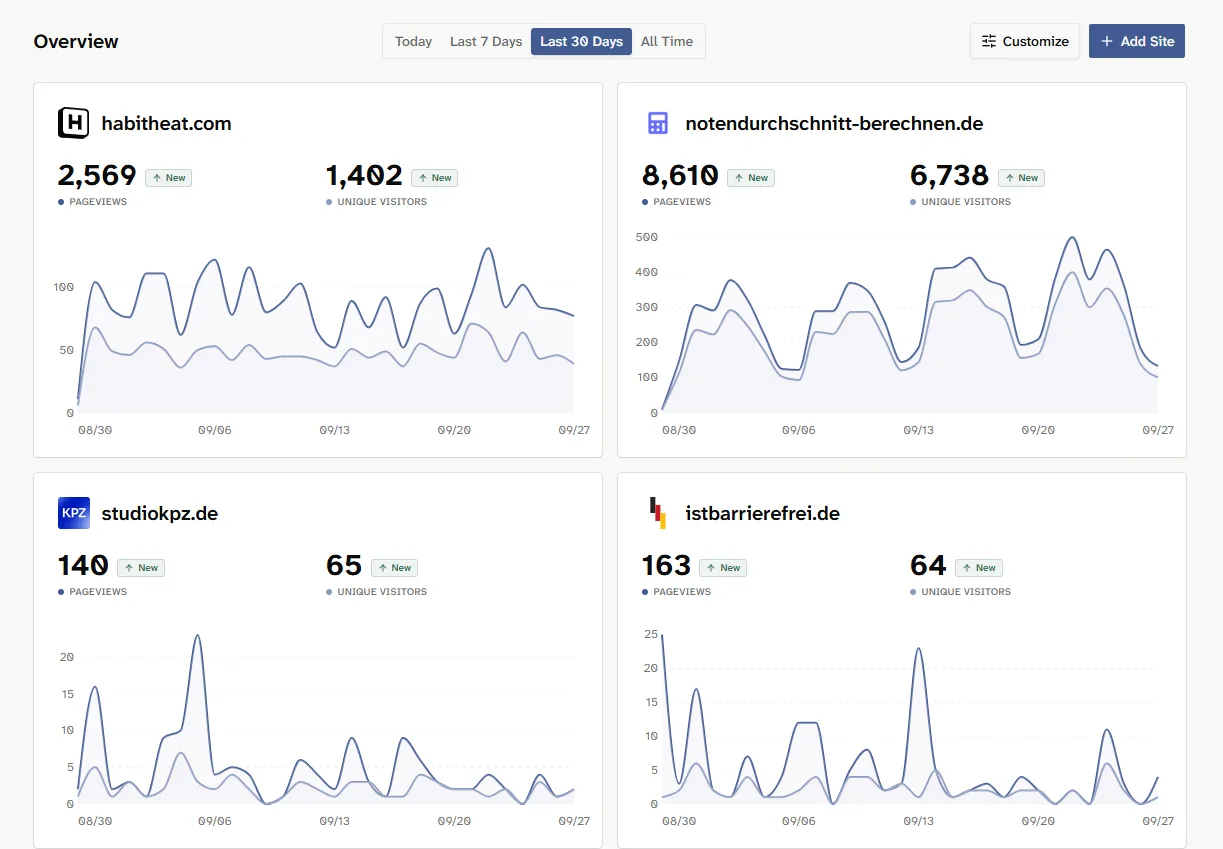
A lot of the details are currently shown in tables. While building Lienks, I realized that I sometimes need those tables, but rarely all at once. Some days, I just want to quickly see what happened on my websites and then get back to work.
I want to focus more on that in future versions. One idea is an activity feed that summarizes important changes and milestones for one website or even all your websites. The detailed views will stay for when I want to investigate a specific question. But for a quick check, I want Lienks to show me the most important information more directly. I also want to learn from how people use it to figure out what works best.
Three ways to handle visitor data
When I build an analytics tool, I have to decide what data it collects and how it recognizes visitors. Instead of hiding that decision, Lienks offers three modes that you can choose separately for each website:
Minimal: Records pageviews without recognizing returning visitors.
Cookieless: The default mode. Recognizes visitors within a day without cookies; the identifier used for this changes daily.
Cookie: Recognizes returning visitors using a cookie for up to 24 hours. This mode is intended for use with the appropriate consent.
In the settings, I explain what each mode means and provide information for your privacy notice. This should make setup easier, but it doesn’t replace a review of your own website. Especially when it comes to consent and your privacy policy, you should have your specific use of Lienks reviewed by a legal professional.
This is version one
Lienks is already a complete product you can use. At the same time, V1 is the foundation I want to build on. Beyond how the data is presented, I’m now especially interested in where new users get stuck: Is adding a website straightforward? Do the numbers make sense? Do sign-up and billing work as expected?
That’s why I want to find the first people willing to try Lienks on their websites and tell me honestly what works well and what’s still unclear. Their feedback will play an important role in the next versions.
I’ll document changes in the changelog. Here on the blog, I also want to write about why I make certain decisions. I already have ideas for what comes next, but how people use Lienks and the conversations I have with them should help shape those decisions.
If you run a website, you can try Lienks free for 30 days without adding a payment method. And if you have a question or an idea, or something doesn’t work as expected, email me at philip@lienks.com. I read every message.