
Counting page views is easy. Counting visitors is harder, especially without cookies.
For page views, you just count every request. But to count visitors, an analytics tool needs to know whether two page views come from the same person. The classic solution is a cookie: on the first visit, the browser gets a random ID, and it sends that ID back with every following request.
Without a cookie, you need a different approach. In this article, I explain how that works. I’m using Lienks as the example, my own analytics tool, because I know exactly what happens in the code.
Whether you need a cookie banner for web analytics is a separate question. I cover that in my article Do I need a cookie banner for web analytics?. This one is only about the technical side.
What the browser sends anyway
Every time you open a website, your browser sends some information to the server. This happens on every website, whether it runs an analytics tool or not.
Two pieces of that information matter most for counting visitors:
- The IP address. Without it, the server wouldn’t know where to send the response.
- The user agent. This is a line of text that says which browser and operating system you use, for example Firefox on Windows.
On top of that, the browser sends the page you’re visiting and, if there is one, the page you came from.
The Lienks script doesn’t need to store or read anything on your device for this. It only sends the page view to the server, and the IP address and user agent come along automatically.
Turning IP and browser into an ID
On the server, Lienks creates an ID from three things: the website, the IP address and the user agent.
To do that, Lienks uses a hash. A hash is a function that turns an input into a long, random-looking string. Two properties are important here:
- The same input always produces the same ID. If two page views come from the same IP and the same browser on the same website, they end up with the same ID. That’s how Lienks knows it was one visitor.
- You can’t simply go back from the ID to the IP address. The calculation only works in one direction.
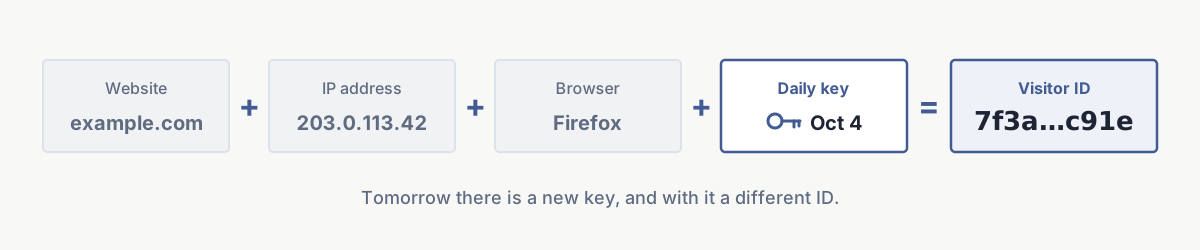
The website is part of the calculation so that the same person gets two different IDs on two different websites. If someone visits your website and another website that uses Lienks, those visits can’t be linked through the ID.
Why a secret key that changes every day
A plain hash on its own wouldn’t be secure enough. There are only about four billion IPv4 addresses and a limited number of common browsers. A computer could try every combination and find out which IP belongs to which ID.
That’s why Lienks adds a secret key to the calculation. Technically, it’s an HMAC with SHA-256, which is a hash with a key. Without the key, the ID can’t be recalculated.
And this key changes every day. Lienks derives it from a fixed secret and the current date. The daily key isn’t stored anywhere. It’s calculated in memory for each request.
This has an important effect: the same person gets a new ID the next day. So Lienks doesn’t connect visits from Monday and Tuesday. The day changes at midnight UTC.
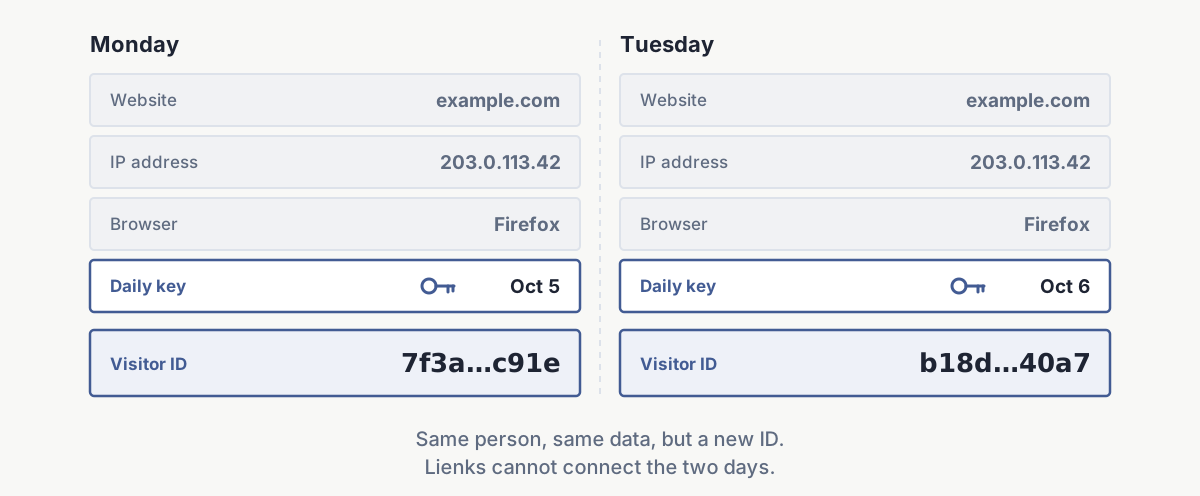
To be fully honest: anyone who knows the fixed secret and also has the IP address and browser of a specific person could recalculate that person’s ID for a specific day. But Lienks doesn’t store which ID belongs to which IP anywhere. Without the IP, the browser and the secret, an ID can’t be matched to a person.
What actually gets stored
The IP address and user agent are only used for the short moment when the ID is calculated. Neither of them is stored.
In the Lienks database, a page view looks roughly like this:
Timestamp:  2026-10-18 09:14:03
Page:       /blog/how-does-cookieless-tracking-work
Referrer:   google.com
ID:         3f9a1c…e72b (64 characters)
Browser:    Firefox
OS:         Windows
Device:     Desktop
Country:    DE
Lienks only stores browser, operating system, device and country if you turn that on for your website. By default, these fields stay empty. And even then, only broad categories end up in the database, so “Firefox” and not the exact version.
Lienks looks up the country with a database that sits directly on the server. The IP address isn’t sent to another service for this. All that’s left is the country code, for example “DE”.
In this mode, Lienks stores nothing at all on your device, no cookie and nothing in localStorage.
What you give up
This method isn’t as accurate as a cookie. It’s good to know that before you read the numbers.
- New IP, new visitor. If someone switches from Wi-Fi to mobile data during the day, their IP address changes. Lienks then counts that person twice.
- Same IP, same browser. If several people in the same office or household use the same browser on the same system, Lienks can’t tell them apart and counts them once.
- No returning visitors. Because the ID changes every day, Lienks doesn’t know whether someone was already there yesterday.
- Visitors per week or month. For the same reason, the visitor count over a longer period is basically the sum of visitors per day. Someone who stops by on three days in a week counts as three visitors.
For most websites, that’s accurate enough. You can reliably see whether an article does well, where visitors come from, or whether a page gets more views than last month. But it’s not an exact count of unique people.
Isn’t that fingerprinting?
No, even though the two sound similar at first.
With fingerprinting, a script in the browser deliberately reads many properties of the device, such as screen size, installed fonts or how the graphics card draws something. Together they form a fingerprint that can often recognize a device for weeks and across many websites.
Lienks doesn’t do that. The script doesn’t read any properties from the device. The ID is created on the server, only from what arrives with every request anyway. And it’s only valid for one website and one day.
In short
Here’s how cookieless tracking works in Lienks: the server creates an ID from the website, the IP address and the browser, using a secret key that changes every day. Only that ID is stored, not the IP and not the user agent. Nothing ends up on your visitors’ devices.
In return, counting is a bit less accurate than with a cookie, and visitors aren’t recognized across several days. I think that’s a good trade.
Besides this cookieless mode, Lienks also has a minimal mode without a visitor ID and a mode with a cookie. Which one fits which case is explained in my article about cookie banners.
If you’d like to try it, you can test Lienks free for 30 days, no payment method required. And if you have questions or something in this article is wrong, email me at philip@lienks.com.